

Open Source Ops Stack for an Engineering Firm
Overview
Our partner runs a structural engineering firm that handles both residential and commercial projects. Like a lot of engineering offices, they had built up a system over the years that technically worked, with emails for communication, spreadsheets for tracking, and local drives for storing files, but it was starting to show its age.
As the team and project volume grew, so did the friction. Information was spread across too many places, and no one had a clear picture of where things stood on any given project without digging through their inbox.
We set out to build something that would pull everything together: a central place to track projects, a way to generate documents automatically, and a simple interface the team could use without changing how they already worked day to day.
The Challenge
The firm's biggest operational bottleneck was not any single problem. It was the accumulation of small ones. Every project required manually drafting proposals, invoices, and status reports. Partner contacts lived in one person's email. Project files were scattered across shared drives with inconsistent naming. When someone needed to know the status of a project, the answer was usually "let me check with so-and-so."
Key pain points going into the project:
- No central system for tracking active projects, partners, and invoices
- Proposals and invoices created manually from scratch each time, taking 30 to 45 minutes
- Slack was the team's main communication channel, but none of those conversations were captured or linked to project records
- Files from permit portals and partners had to be manually downloaded and organized
- Project history only existed in people's heads or buried email threads
Why Open Source
For an engineering firm handling confidential contracts, structural drawings, and partner agreements, keeping data in-house mattered. We ruled out cloud-only SaaS tools early. The right answer was a self-hosted stack the firm could fully control.
Open source also made practical sense on cost. Per-seat licensing adds up fast as teams grow, and the tools we chose, Twenty CRM and n8n, have strong communities, active development, and APIs that made integration straightforward.
The Architecture
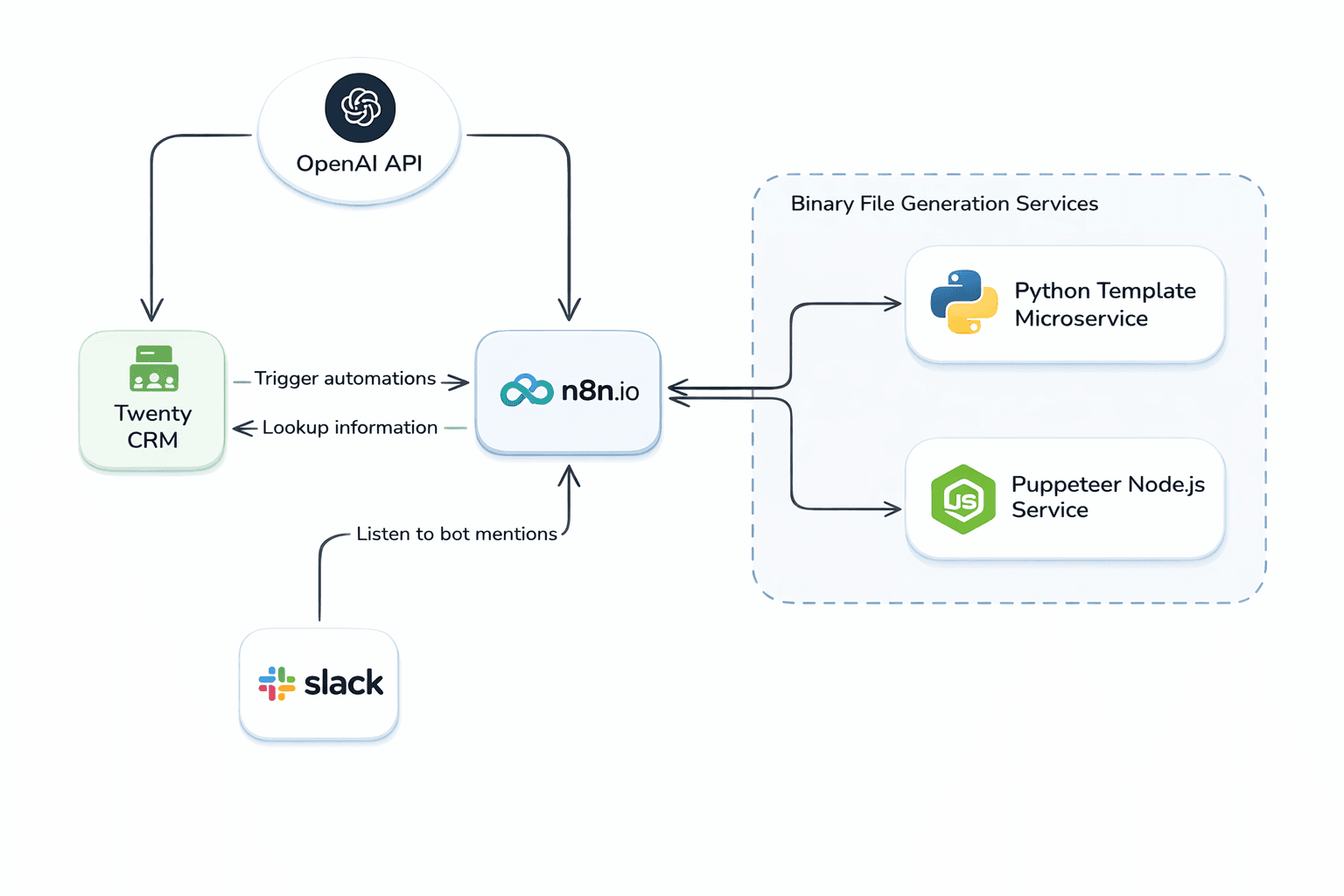
The system is built around four main components: Twenty CRM as the data layer, n8n as the automation engine, a Slack bot as the team's interface, and a pair of supporting microservices for document generation and file capture.
Slack listens for bot mentions and forwards them to n8n, which uses the OpenAI API to interpret what the team member is asking for. Depending on the intent, n8n either queries Twenty CRM and posts a response back to Slack, or kicks off a document generation workflow. The Python Template Microservice handles ODT document population, and the Puppeteer Node.js Service handles downloading files from external links and storing them in Twenty.
Twenty CRM: The Single Source of Truth
Twenty is an open source CRM with a flexible data model and a GraphQL API, which made it a good fit for a setup that needed custom fields and tight integration with automation tools. We configured it to store everything the team needed in one place:
- Projects: linked to partner contacts, with fields for project type (residential or commercial), site address, and permit status
- Partner contacts: replacing the scattered mix of email contacts and spreadsheet rows
- Files: drawings, permits, proposals, and reports, all attached to the relevant project record
- Invoices: tied to projects and partners, with status tracking
Having everything linked meant that when a document was generated or a file was captured, it landed in the right place automatically, with no manual filing required.
The Slack Bot
The team already used Slack every day, so we built the interface there rather than asking anyone to log into a new tool. n8n has a native Slack trigger that listens for bot mentions, so there was no need for a separate chatbot server.
When a team member mentions the bot, whether they're at their desk or on a job site, n8n picks up the message and sends it to the OpenAI API. OpenAI extracts the intent and relevant entities: which project, which partner, what kind of document. From there, n8n either pulls data from Twenty and replies directly in Slack, or triggers the appropriate automation workflow.
A few examples of what the team can do from Slack:
- Ask for the current status of a project and get a summary pulled straight from Twenty
- Look up open invoices for a specific partner
- Trigger invoice or proposal generation for a project
- Get a list of files attached to a project record
n8n Workflow Automations
n8n handles all the automation logic and acts as the connective tissue between the other components. We built three core workflows:
Invoice Generation
Triggered from Slack or manually within n8n. The workflow pulls project and partner data from Twenty, sends it to the Python Template Microservice, which populates an ODT invoice template using find-and-replace substitution. The completed file is saved back to the project record in Twenty and the partner is notified by email. What used to take 30 to 45 minutes now takes under 2.
Proposal Creation
Works the same way as invoice generation but uses the project's scope of work fields to populate a proposal template. The finished proposal is attached directly to the project record in Twenty, ready to send.
Weekly Status Report
A scheduled workflow that runs automatically, aggregates the status of all active projects, and posts a summary to the team's Slack channel. The team starts each week with a current snapshot of everything in flight without anyone having to compile it manually.
Supporting Services
Two microservices handle tasks that n8n delegates out:
- Python Template Microservice: receives structured project data from n8n, loads the appropriate ODT template, performs find-and-replace substitution, and returns the populated document
- Puppeteer Node.js Service: a headless browser service that downloads files from external links, such as permit portal documents or partner-shared files, and stores them as attachments on the relevant project record in Twenty
The Results
After rolling out the system, the team's day-to-day operations changed in a few concrete ways:
- Engineers on job sites can check project status or pull up partner details from their phones without logging into anything new
- Invoice and proposal creation went from 30 to 45 minutes of manual work to under 2 minutes triggered from Slack
- All project documents (proposals, invoices, permits, drawings) are automatically stored and linked in Twenty, ending the file-hunt problem
- The weekly status report removed a recurring manual task and gave the whole team consistent visibility into active work
Tech Stack
- Twenty CRM: self-hosted open source CRM (twenty.com)
- n8n: self-hosted workflow automation with native Slack trigger (n8n.io)
- OpenAI API: intent extraction and entity recognition within n8n workflows
- Python Template Microservice: ODT template engine using find-and-replace substitution
- Puppeteer Node.js Service: headless browser service for capturing files from external links
- PostgreSQL: backing database for Twenty CRM and n8n
More Output, Less Overhead
The biggest shift this project delivered was operational. The team spends less time on administrative work and more time on actual engineering. Document generation that used to require manually drafting and formatting now happens in seconds. Project information that used to live in someone's email is now searchable by anyone on the team.
Because everything in this stack is self-hosted and open source, the firm also avoids per-seat SaaS fees that would grow with every new hire. They own their infrastructure and their data outright, with no vendor dependencies on pricing or uptime.
The Slack bot ended up being the right call for adoption. The team already lived in Slack, so there was no new tool to introduce, no training to run, and no resistance to work through. The system fit into how they already operated, and that made the difference.